

|
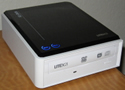


LiteOn EZ-DUB External DVD Drive DX-20A4PU
 |

Today we are checking out the LiteOn EZ-DUB USB DVD writer drive model number: DX-20A4PU. The EZ-DUB is capable of burning DVDs at up to 20x, and since my current internal drive is only an 8x drive, I was excited to get this bad boy out of the box and hooked up. We have explained numerous times the uses and benefits of these external drives and Lite-On products happen to be some of our favorite due to their speed and reliability. It's always our goal to burn as few drink coasters as possible with CD/DVD burners and Lite-On consistently delivers usable media in our experience.
The formats that this device supports are listed in the following table.
| Format | Write speed | |
| CD-ROM | 48x | |
| CD-R | 48x | |
| CD-RW | 32x | |
| DVD-R | 20x | |
| DVD-RW | 8x | |
| DVD+RW | 8x | |
| DVD+R | 20x | |
| DVD+R DL | 8x | |
| DVD-R DL | 8x |
Setup
Tearing into the box, I found: the drive, a power cable, USB cable, and a small envelope that contained setup information. The envelope contained the user manual, some setup information and a compact disk that contained software. As I began to rearrange things on my desk to set up the drive for testing, I noticed that the USB cable was unusually short. The cable is only about two and a half feet long, much too short to stretch across my desk. Apparently, the manufacturer intends users to keep their external drive sitting on top of their computer or in near proximity. Other than this shortcoming, I found the setup of the drive to be uncomplicated. One key thing to note is that this drive needs a USB 2.0 port to be worthwhile; while the drive is compatible with USB 1.0, the transfer speeds are so slow that this drive is not worth having. That being said this limitation would apply to any USB 2.0 external drive plugged into a USB 2.0 system regardless of the manufacturer.
The software that came along with the drive included some custom software to enable the functionality of the dub and file buttons. It also came with a version of Nero 7 essentials, which is basically a stripped version of Nero 7 Ultra but still includes enough functionality to get the job done.

EZ-DUB Concept:
1. Insert the original CD/DVD
2. Press the "DUB" button
3. Replace the disc with a blank disc to record when prompted
1. Drag files to the EZ-DUB folder on the desktop
2. Insert a blank disc
3. Press the "FILE" button
Current Real Time Pricing